Pawfex AI-AI Video Generation
- 4.6
- Rating
- 50.00K
- Installs
- Free
- Price

 Analysis by App-foxy
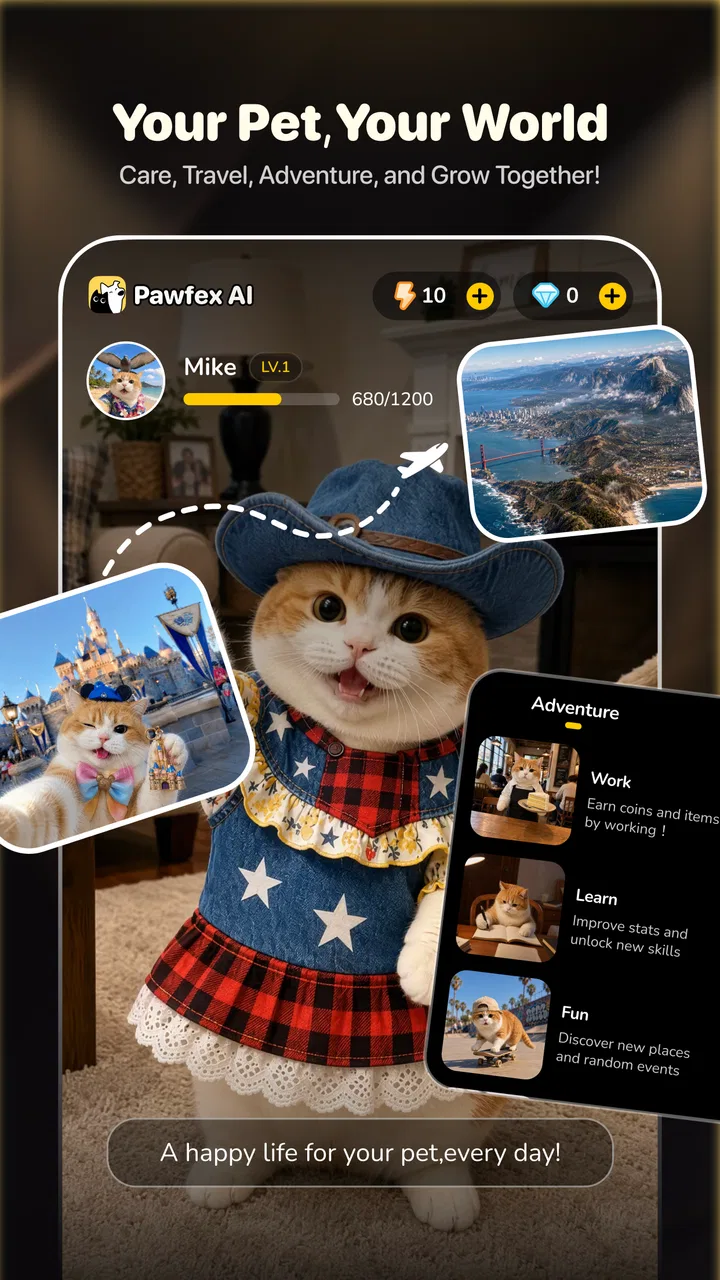
I opened Pawfex AI with a simple goal: turn an ordinary pet photo into something playful enough to share. That starting point matters, because this is not a general photo editor or a full video-production suite. It is a free tools app built around AI-generated pet videos and images, and that narrow purpose makes the experience easy to understand from the first moment.
My overall impression is that Pawfex AI is most useful when you already have a clear subject, a decent photo, and a small creative idea. It can help transform a familiar picture of a dog or cat into a more entertaining result without asking you to learn a complicated timeline editor. At the same time, the app works best as a quick creative experiment rather than a replacement for a serious editor. The difference becomes obvious once you move beyond the first generation and start caring about consistency, precise movement, or a polished final video.
What I started with and who the app is for
The most natural starting condition is a pet photo sitting in your camera roll. It could be a recent snapshot, a favorite portrait, or an image you want to give a more imaginative treatment. Pawfex AI’s store summary describes it as an AI pet video and photo generator, so I approached it as a tool for changing the mood or presentation of existing pet images rather than as a place to record and edit conventional footage.
You May Also Like

 Pandora - Music & Podcasts
Pandora’s Music Is Easy to Start, but Harder to Recover
Pandora’s strength is its low-effort path from a seed to a station. Its weak spot is how much confidence it asks you to place in connection, setup, and quiet recovery.

 AccuWeather: Weather Radar
AccuWeather Review: A Quick, Clear Forecast for Everyday Decisions
For everyday plans, the best forecast is the one you can understand quickly. AccuWeather makes rain timing, radar, and local conditions easy to act on, with a few trade-offs.

 Hill Climb Racing
Why Hill Climb Racing Still Turns Crashes Into One More Run
A tiny car, a bumpy hill and one more upgrade: Hill Climb Racing keeps resurfacing because its simple chaos makes every near-miss feel personal.

 AliExpress - Shopping App
AliExpress Makes Global Shopping Feel Personal, but Shoppers Bear the Risk
AliExpress turns a global marketplace into a pocket-sized discovery engine. Its reach is useful, its shopping loop compelling, and its trade-offs easy to miss.

 Lords Mobile: Kingdom Wars
Lords Mobile Is a Kingdom-Building Routine, Not a Quick Match
A case-by-case verdict on the building, battles, device demands, and social commitments that make Lords Mobile rewarding for some players and exhausting for others.

 PDF Scanner app - TapScanner
TapScanner Makes Paperwork Easier to Capture, Check, and Share
TapScanner makes scanning with a phone feel less like a rescue operation and more like a dependable step in getting work done. Its capture tools are useful, though not flawless.
More From Our News Desk
View All News


That makes the app appealing to pet owners who want a quick social post, a funny message for family, or a new way to revisit an old picture. I can also see it working for someone who manages a small pet-focused social account and needs occasional visual ideas without opening a desktop editor. The app is rated for Everyone, which suits its lighthearted subject matter and makes the concept approachable for a broad audience.
The developer is SINGAPORE BAOLU TECHNOLOGY PTE. LTD, and the app sits in the Tools category. It is free to install, although in-app purchases range from $0.99 to $39.99 per item. That combination is important: you can try the basic experience without paying up front, but repeated experimentation may lead you toward optional spending. I would decide what kind of use I expect before treating it as an everyday creative utility.
The current version is 1.6.6 and it requires Android 7.0 or later. On the adoption side, the app has passed 50 thousand installs, with a 4.6 average from around 2.2 thousand ratings and 207 written reviews. Those figures suggest that the idea has found an interested audience, but they do not change my practical advice: test the workflow with one disposable idea before preparing an important post or paying for more generation.
Choosing the right input before asking for a result
The first useful lesson is that the input photo does more work than I initially expected. A clear image with the pet visible and enough space around it gives the AI a better starting point than a dark, crowded snapshot. If the animal is partly hidden behind furniture, cropped tightly, or facing away, the result has less visual information to work with. That is not a Pawfex-specific technical promise; it is simply the most sensible way to approach an image-generation workflow.
I would prepare two or three candidate photos instead of committing immediately to the first one. A front-facing portrait may be best for a character-like transformation, while a full-body image may make more sense for an action-oriented idea. This small selection step saves time later because a weak source image can make the generated result feel strange even when the concept itself is good.
There is also a privacy consideration that deserves attention before uploading anything. Pet photos often include people, home interiors, collars, address labels, or other identifying details. I would crop out unnecessary background information and avoid using an image that reveals something I would not want processed by an online creative service. For a casual pet portrait this may be a minor step, but it is a useful habit whenever an app transforms personal media.
The generation flow from photo to creative output
Once the starting image is chosen, the appeal of Pawfex AI is its reduced distance between idea and result. Instead of arranging clips, selecting transitions, and manually animating a still picture, I can focus on the intended mood. The practical workflow is straightforward in concept: bring in a pet image, choose or describe the kind of transformation I want, wait for the generation, and then inspect what came back.
I would treat the first attempt as a draft, not as the finished piece. AI-generated media can produce an appealing overall impression while still getting small visual details wrong. A pet’s markings may look less consistent from one moment to another, or an action may not match the original pose as naturally as expected. The right question after generation is not simply “Is this impressive?” but “Does this still look enough like my pet to be worth sharing?”
A useful workflow is to change only one thing between attempts. If the first result feels too dramatic, adjust the creative direction while keeping the same photo. If the pet’s appearance is unstable, switch the source image before changing everything else. This makes it easier to understand whether the problem comes from the input or from the requested style. Randomly changing both at once may produce another result, but it teaches me nothing about how to improve the next one.
I also recommend keeping the creative idea simple at first. A short, clear concept is easier to judge than an overloaded request involving several actions, locations, and moods. The more ambitious the idea, the more opportunities there are for the generated output to drift away from the original animal. Pawfex AI is more convincing when the transformation feels like an extension of the photo rather than an attempt to build an entire fictional scene around it.
Where the handoffs create friction
The most important handoff is between my original photo and the AI’s interpretation. I provide a real, familiar animal; the app returns an imagined version. That handoff is where the fun comes from, but it is also where expectations need to be managed. The output may capture the personality I had in mind without preserving every physical detail. For a joke or casual message, that can be acceptable. For a keepsake portrait, it may be disappointing.
The next handoff is from generation to sharing. A result that looks fine inside the app still needs to work in the place where I intend to use it. I would check the complete output before sending it to a group chat or posting it publicly, paying attention to the opening moment, the ending, and whether the movement feels coherent throughout. A quick preview is especially important when the image contains a distinctive face, unusual markings, or a recognizable accessory.
Another practical handoff involves cost. Because the app is free to start but offers purchases from $0.99 to $39.99 per item, I would not begin a large batch of experiments without first understanding which actions consume paid resources, if applicable in the version I am using. I would also avoid assuming that a failed or merely average generation will automatically be worth repeating. The creative process is more enjoyable when I set a small trial budget and stop once the results stop improving.
The download or sharing stage is also where I would keep an original copy of the source photo. AI transformations are experiments, not replacements for the pictures that matter. Saving the untouched image separately means I can try different creative directions without losing the personal record that made the project worthwhile in the first place.
What the finished result is good at
Pawfex AI’s strongest outcome is a quick, shareable moment built around a pet people already care about. Imagine taking a calm photo of a dog after a walk, generating a playful variation, and sending it to a family chat while the memory is still fresh. The value is not professional production quality; it is the speed of turning a familiar image into a conversation starter.
The app can also help when I have an idea but not the editing skills to express it manually. A traditional mobile editor gives me control over crops, filters, text, music, and timing, but it expects me to make those creative decisions myself. Pawfex AI shifts more of the visual invention to the generation process. That is convenient for a person who wants a surprising result rather than a carefully assembled one.
Compared with ordinary photo filters, the concept feels more substantial because the goal is not merely to adjust color or add a decorative overlay. Compared with a conventional video editor, it is less precise but much less demanding at the beginning. I would choose Pawfex AI for a fast transformation of one pet image, and a standard editor when I need exact timing, a controlled sequence, captions, or a consistent visual style across several clips.
There is a useful distinction between personal amusement and public-facing content. For a private joke, a little visual oddness can make the result better. Friends may enjoy noticing that the generated movement is exaggerated or that the scene has an unmistakably artificial quality. For a business account, adoption campaign, or polished brand post, I would want more control and a reliable review process before publishing.
Everyday workflow: from a camera-roll photo to a family message
Here is the situation in which I think the app makes the most sense. I have a clear photo of a cat sitting near a window, and I want to send relatives something more memorable than the original image. I would first crop away distracting household details, select the sharpest version, and choose a modest creative direction rather than trying to turn the cat into the star of an elaborate action scene.
After the first generation, I would watch the result all the way through instead of judging it from a single frame. If the cat remains recognizable and the movement supports the joke, I would save it and send it privately. If the face or markings change too much, I would return to the source-photo step and try a better crop or a different image. That is a more reliable workflow than repeatedly pressing generate with no change in the input.
For a family chat, I would also consider whether the animation communicates without explanation. A result that needs a long caption to explain what is happening may not be as effective as a simpler transformation. This is one of the app’s quiet strengths: it encourages me to think in small visual ideas that can be understood quickly.
Three practical habits that improve the experience
First, separate the “identity” photo from the “action” photo. If I want the pet to remain recognizable, I choose an image with a clean view of the face and markings. If I want a more energetic result, I choose a full-body image with room around the animal. Expecting one tightly cropped portrait to perform equally well for every creative direction is an avoidable source of frustration.
Second, use a two-stage review. I inspect the overall mood immediately, then look closely at the pet’s face, paws, pattern, and accessories. AI output can be convincing at a glance while becoming less believable when paused. This matters more for a beloved pet than for a generic subject, because small identity changes are easier for the owner to notice.
Third, treat generations as a selection process rather than a promise. The best result may not be the most dramatic one. I would choose the version that keeps the animal recognizable and the movement readable, even if another attempt looks more spectacular for a moment. That trade-off is especially valuable when sharing with people who know the pet personally.
A fourth habit is to keep the final handoff in mind from the beginning. If the goal is a message, prioritize clarity and a quick visual payoff. If the goal is a saved memory, prioritize resemblance and emotional tone. If the goal is a public post, inspect the result more critically and consider finishing it in a conventional editor. Pawfex AI can start the idea, but it does not need to be the only tool involved.
Where the workflow breaks down
The main limitation is control. A traditional editor lets me decide exactly where a clip starts, how quickly an effect develops, and which frame appears at the end. An AI generator is more interpretive. That can produce delightful surprises, but it also means I may not get the precise movement or composition I imagined. If exact results matter, the usual alternative is better.
Consistency is another weak point for any pet-focused transformation workflow. When the subject has distinctive stripes, spots, long fur, or a particular collar, even a small alteration can make the result feel like a different animal. I would skip Pawfex AI for a project where visual continuity across multiple scenes is essential unless I am prepared to review every output carefully and accept some manual cleanup elsewhere.
The app is also not the right choice for someone looking for a complete production environment. If I need voiceover editing, layered sound, detailed captions, precise cuts, or a repeatable template for many posts, a conventional video editor offers more dependable control. Pawfex AI is better understood as a creative generator that may produce the key visual, not as a full replacement for every tool in a creator’s workflow.
Cost can become a friction point for curious users who enjoy trying many variations. The free entry is helpful, but the listed purchase range means I would pay attention before turning experimentation into a habit. Someone who wants unlimited, low-cost tinkering may prefer a tool with a clearer editing model and fewer generation-related purchasing decisions.
I would also skip it when the source image is sensitive or when the pet photo includes people who have not agreed to have their image transformed. A playful result is not worth creating an avoidable privacy problem. Cropping helps, but it does not remove the need for judgment about what I upload.
How I would decide whether to keep it
I would keep Pawfex AI on my phone if I regularly take pet photos and enjoy turning them into quick surprises. The free starting point lowers the barrier, the age rating makes the concept broadly approachable, and the app’s focused purpose is easier to understand than a large creative platform filled with unrelated tools. Its best use is occasional, intentional experimentation with a photo I already like.
I would not choose it as my only media app. The generated result still needs human judgment, and sometimes it needs a conventional editor afterward. The strongest workflow is complementary: Pawfex AI supplies an imaginative transformation, while a familiar photo or video editor handles exact trimming, text, sound, or final presentation.
The app has earned a 4.6 average and a growing audience, but my recommendation is based more on the workflow than on the number. If you want an easy way to make a pet image feel new, it is worth trying. If you need predictable animation, professional consistency, or detailed manual control, start with the usual editor instead.
My final take after following the complete process
Pawfex AI is at its best when the goal is a small, personal creative win. I start with a good pet photo, keep the idea focused, inspect the generated result carefully, and share only after checking that the animal still looks like itself. Followed that way, the app turns a routine camera-roll image into something fun without demanding advanced editing knowledge.
Its limitations are just as clear: AI interpretation can replace precision with surprise, repeated attempts may make the purchase model more relevant, and serious creators will quickly want controls outside the app. Those are not reasons to dismiss it; they define the situations in which it works. For a quick family message, a playful social post, or a low-pressure creative experiment, I would recommend giving it a try. For exact storytelling or polished production, I would hand the result to a traditional editor and let Pawfex AI remain the imaginative first step.
FAQs for Pawfex AI-AI Video Generation
01What is Pawfex AI-AI Video Generation, and what can it do?
Pawfex AI-AI Video Generation is an artificial intelligence tool designed to create short videos from written prompts, images, or other user-provided ideas. It may help turn concepts into animated scenes, social media clips, promotional content, or creative experiments without requiring advanced editing skills. Results can vary depending on the prompt, source material, and available features in the current version.
02Is Pawfex AI-AI Video Generation free to use?
Before downloading, users should check the app’s current pricing details because access may include a free tier, limited credits, advertisements, or optional paid subscriptions. AI video generation can require considerable processing resources, so some features, higher resolutions, longer clips, faster rendering, or watermark removal may be restricted to premium plans. Review renewal terms carefully before starting a trial.
03Does Pawfex AI-AI Video Generation require an internet connection?
Yes, an internet connection is generally expected for an AI video generation application. Your prompts, images, and generation requests may need to be processed on remote servers rather than directly on the phone. Performance can depend on connection speed and server demand, and creating a video may take longer during busy periods. Offline editing or playback options may be limited.
04Is content created with Pawfex AI-AI Video Generation safe to use commercially?
Users should not automatically assume that every generated video is cleared for commercial use. Rights can depend on Pawfex’s terms, the plan selected, the source images or music used, and the AI models involved. Avoid uploading copyrighted, private, or identifiable material without permission, and review the app’s licensing and acceptable-use policies before publishing generated content.
05What should I know about privacy when using Pawfex AI-AI Video Generation?
Because video generation may involve uploading prompts, photos, videos, or other personal material, privacy is an important consideration. Read the app’s privacy policy to understand how content is stored, processed, shared, and deleted. Avoid submitting sensitive documents, confidential business footage, or images of other people unless you have permission and are comfortable with cloud-based processing.
Pros
- Creates engaging pet videos from simple text prompts.
- Useful for social media posts
- reels
- and short-form content.
- AI generation makes creative experiments quick and accessible.
- Can turn basic ideas into polished-looking visual scenes.
- Appeals to pet owners seeking entertaining personalized content.
Cons
- Results may not accurately capture a pet’s unique appearance.
- Some generations can include unnatural movements or visual glitches.
- High-quality videos may require credits
- subscriptions
- or extra costs.
- Processing times can vary during busy periods or with complex prompts.
- Generated content may need editing before it is ready to publish.

Pawfex AI-AI Video Generation
Gallery